
Did it work?
Track progress between audits.
You fixed things, you ran a new audit, and now you want to know what actually changed. Audit Journey shows the trend over time, Compare Audits shows the details between two audits. Here’s how to read both without fooling yourself.
- Run a new audit once your fixes are live. One audit tells you where you are; two tell you whether you moved.
- Audit Journey shows your score, errors, warnings and categories across every saved audit.
- Compare Audits puts two audits side by side: what got better, what got worse and which URLs changed.
- Only compare like with like. Different settings, checks or coverage can move the numbers on their own.
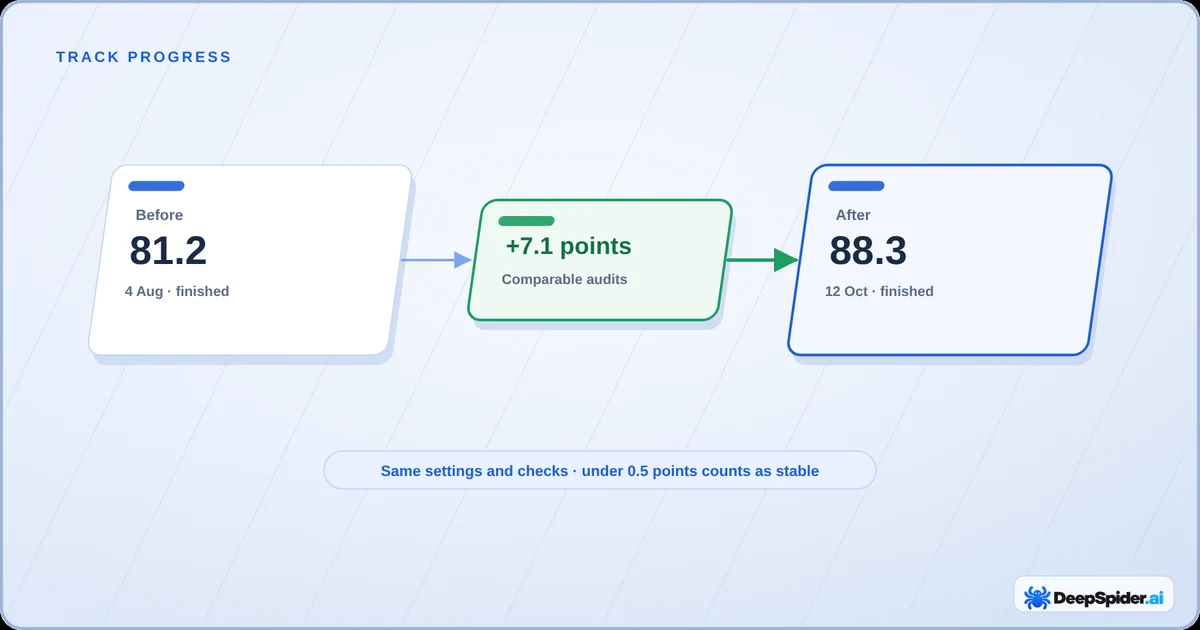
When to run the next audit
Run the next audit when your changes are actually live on the website, not when they’re sitting in a staging copy or waiting in someone’s to-do list. DeepSpider reads the public website, so it only sees what visitors and crawlers see.
A few habits that save you a headache later:
- Keep the settings the same. Same page and image limits, same crawl speed. If you change them, the numbers can move without anything on the website changing.
- Give big fixes a full audit. A smaller limit is handy for a quick look, but it compares badly with a full audit from last month.
- Don’t expect Google to catch up overnight. Your audit shows the fix straight away. Google has to recrawl the pages first, and that can take days or weeks.
Saved audits stay in your history until you delete them, so you can always compare against an older one.
Audit Journey: the trend over time
Next to the Website Health Score in Audit Workspace there’s a small Audit Journey chart. Click it, or open Compare → Compare Audits in the header, and you get the full view with every saved audit of the website.
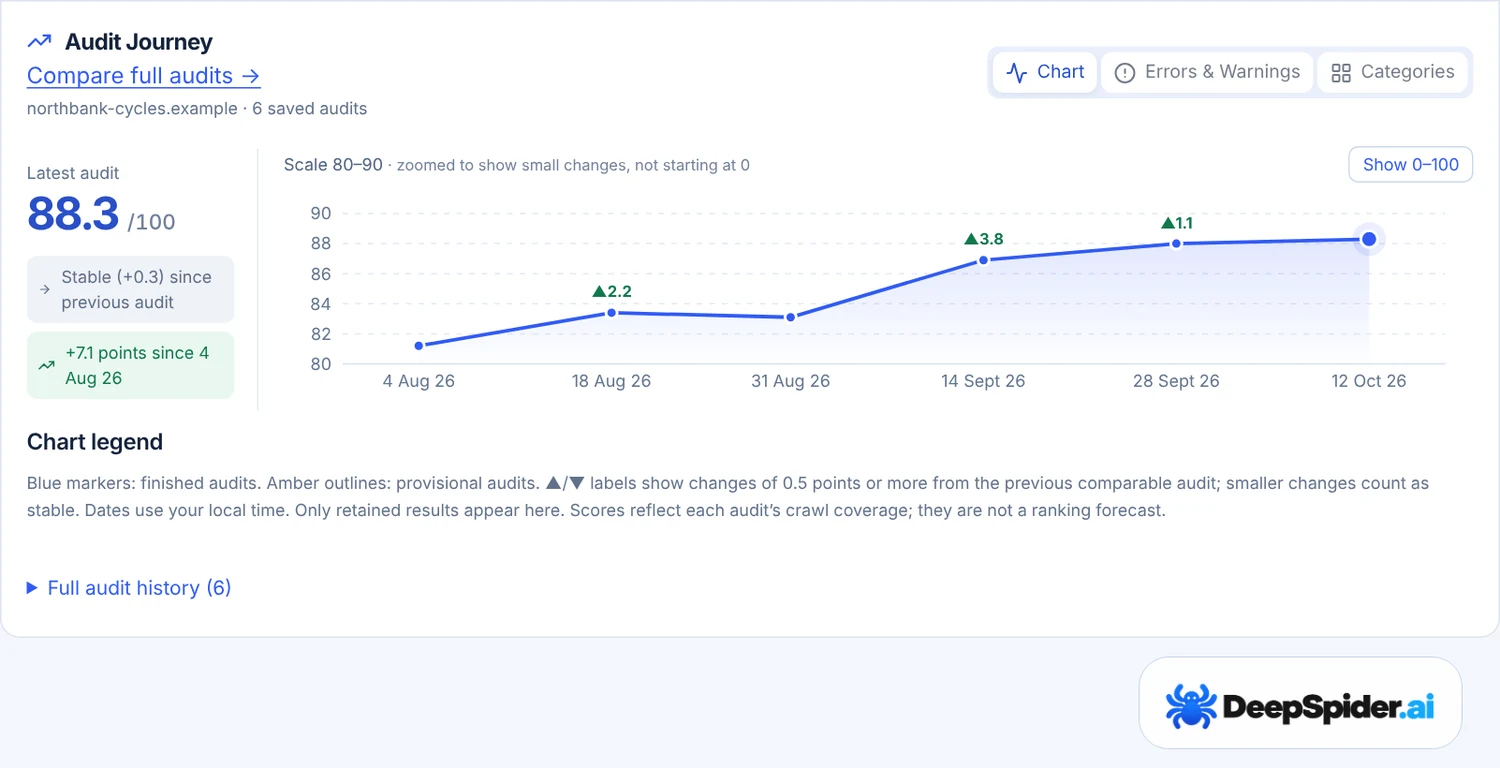
A couple of things worth knowing:
- The scale zooms in. If your scores sit between 81 and 89, the chart shows 80 to 90, so small changes don’t get flattened into a straight line. It says so above the chart. Press Show 0–100 if you want the whole scale.
- Small wobbles are “stable”. A change of less than 0.5 points is marked stable. That’s noise, not progress, and not a disaster either.
- Arrows show real moves. ▲ and ▼ labels appear on audits that moved 0.5 points or more from the previous comparable audit.
The scores reflect what each audit could crawl. They are not a ranking forecast, so don’t read a two-point bump as “we’ll be on page one by Friday”.
Errors, warnings and categories
The score is one number. The other two tabs in Audit Journey show what’s behind it.
- Errors & Warnings draws the totals of each audit as two small charts. These are findings, so one page can count in several checks. The change since the previous audit only shows when the two audits are comparable.
- Categories lists Technical, Structure, Content and Metadata with the latest audit first. Each row is coloured on its own scale: its best score green, its weakest orange. Under every score you see the change from the audit before it.
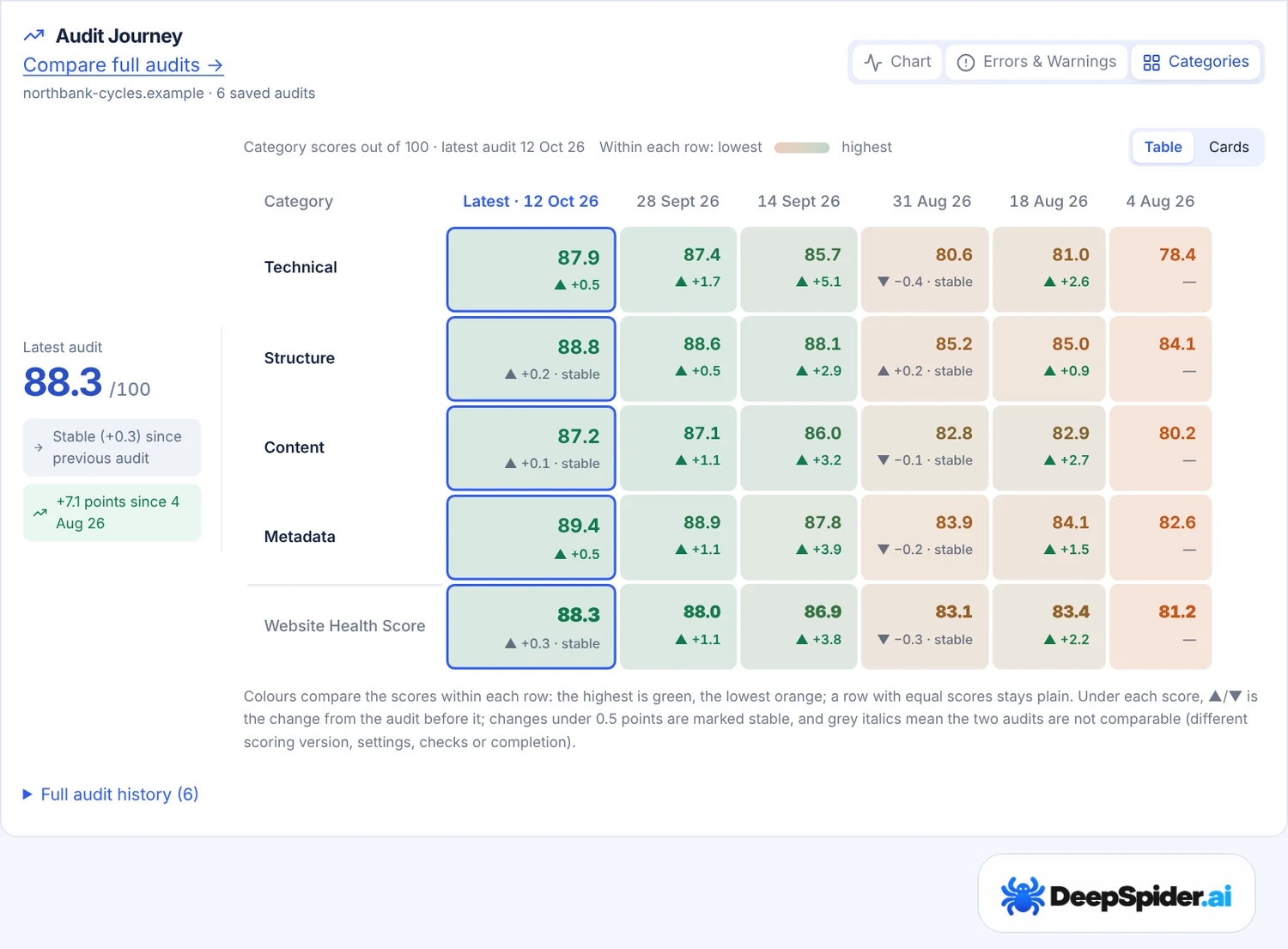
Grey italic changes mean the two audits aren’t comparable, for example because the settings or the checks differed. The number is shown, but don’t lean on it. Prefer a card per category? Switch to Cards.
Compare Audits: two audits side by side
Audit Journey tells you that something moved. Compare Audits tells you what. Open Compare → Compare Audits, pick the website and choose a Before and an After audit. The list only offers websites with at least two full audits.
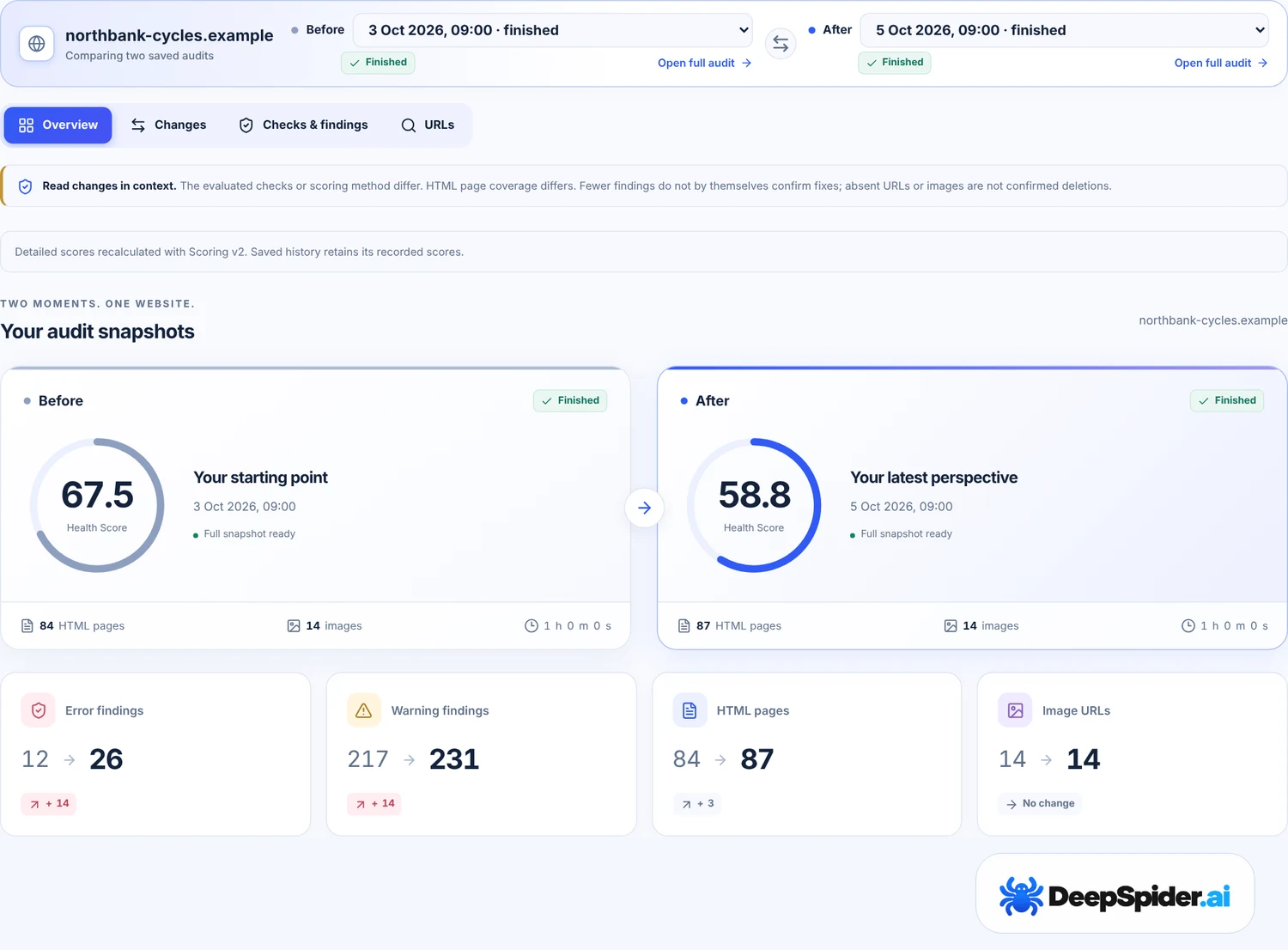
There are four tabs:
| Tab | What it shows |
|---|---|
| Overview | Both Health Scores, errors and warnings, pages and images, the categories, and which checks have fewer or more findings. |
| Changes | What changed for search, plus Content and Images switches for text and image changes. |
| Checks & findings | Check by check: how many findings before and after, and which URLs are newly reported. |
| URLs | Every URL with what changed on it, searchable. |
Need the full picture of one audit again? Open full audit under each choice takes you there.
What changed for search
This is the tab most people end up living in. It compares the things search engines care about, URL by URL, for pages requested in both audits:
- status codes and redirects,
- indexability, including where a noindex came from,
- canonicals, titles, H1s and meta descriptions,
- hreflang and structured-data types,
- main text that shrank a lot (by default 30% and 150 words, adjustable in Settings).
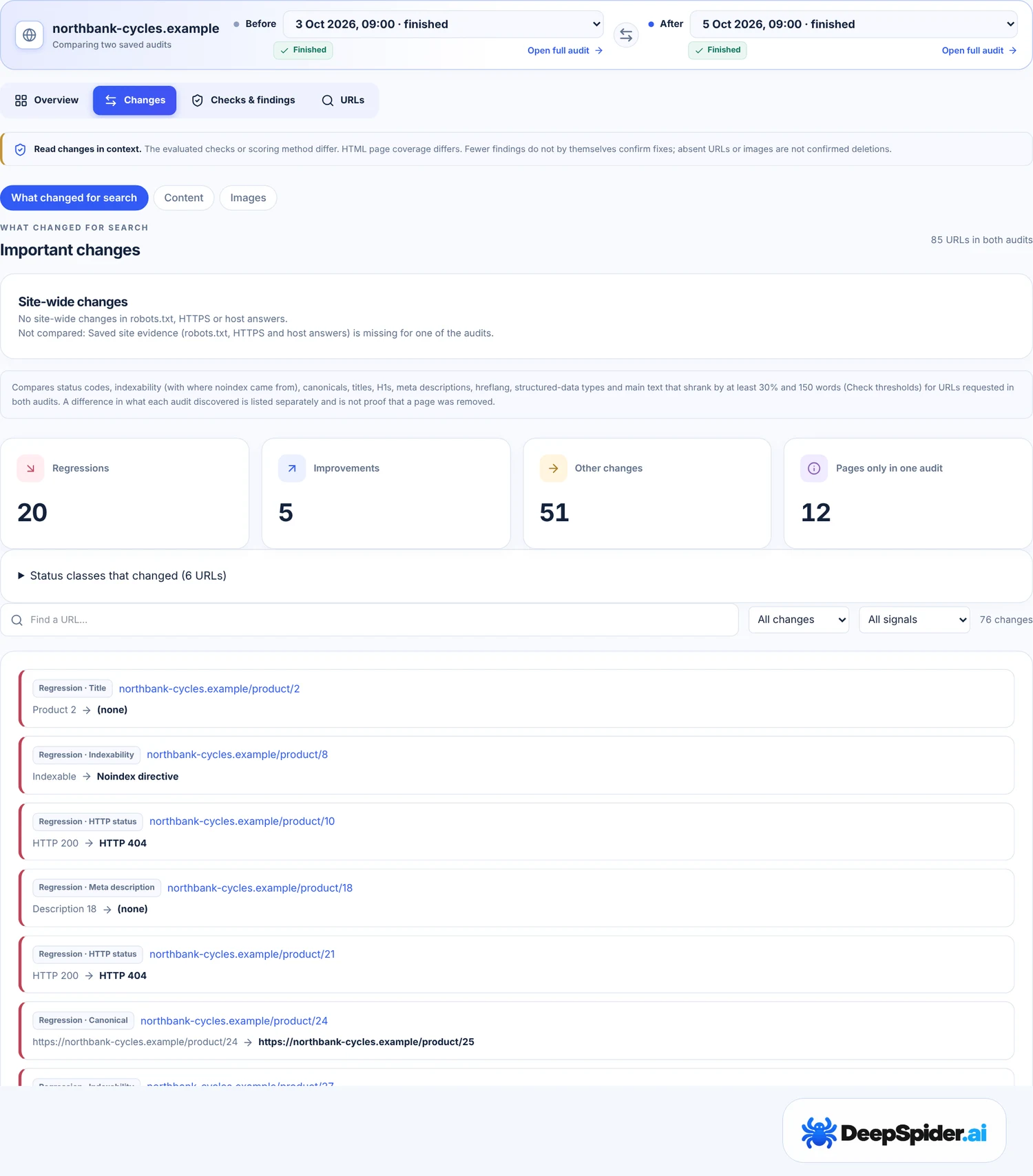
Regressions come first, because that’s what bites. Site-wide changes such as robots.txt, HTTPS or the www and non-www host sit on top, since one line in robots.txt can matter more than a hundred titles.
Pages found in only one audit are listed separately and on purpose: a page missing from the new audit is not proof that it was deleted. Maybe the crawl didn’t reach it this time.
Don’t fool yourself: compare like with like
Numbers can move for boring reasons. Before you celebrate, or panic, check the note at the top of Compare Audits. It warns you when something makes the two audits hard to compare:
- Different coverage. If the new audit checked 2,000 pages and the old one 5,000, fewer findings may just mean fewer pages looked at.
- Different checks. DeepSpider adds checks over time. A newer audit can report things an older one never looked for.
- Different settings or scoring. Limits, thresholds and the scoring version all change the result.
- An unfinished audit. A paused or limited audit compares poorly with a finished one.
The rule of thumb: fewer findings don’t confirm a fix by themselves. Open the check and look at the URLs. If the exact URLs you fixed are gone from the list and the coverage is the same, that’s a real win. Details are in Coverage & settings details at the bottom of Overview.
Questions & answers
My score went down, but I only fixed things. What happened?
Usually coverage or new checks. Compare the HTML pages audited and look at the note at the top of Compare Audits. A newer audit can also find problems that were there all along.
What counts as a real change?
0.5 points or more between comparable audits. Anything smaller is marked stable.
Can I compare two different websites?
Yes, with Compare → Compare Websites. Compare Audits is for two audits of the same website.
Why can’t I pick my website in Compare Audits?
You need at least two full saved audits of it. Run another audit and it will appear.
Does a better audit score mean better rankings?
Not directly. The score shows how healthy the website looks to DeepSpider. Google has to recrawl the pages, and rankings depend on much more than technical health.
Fix, wait until it’s live, run a new audit with the same settings. Audit Journey for the trend, Compare Audits for the details, What changed for search for the URLs. Check the coverage note before you trust a big move.
- Ask Google to recrawl your URLs · Google Search Central