
Why an audit paused
or ended early.
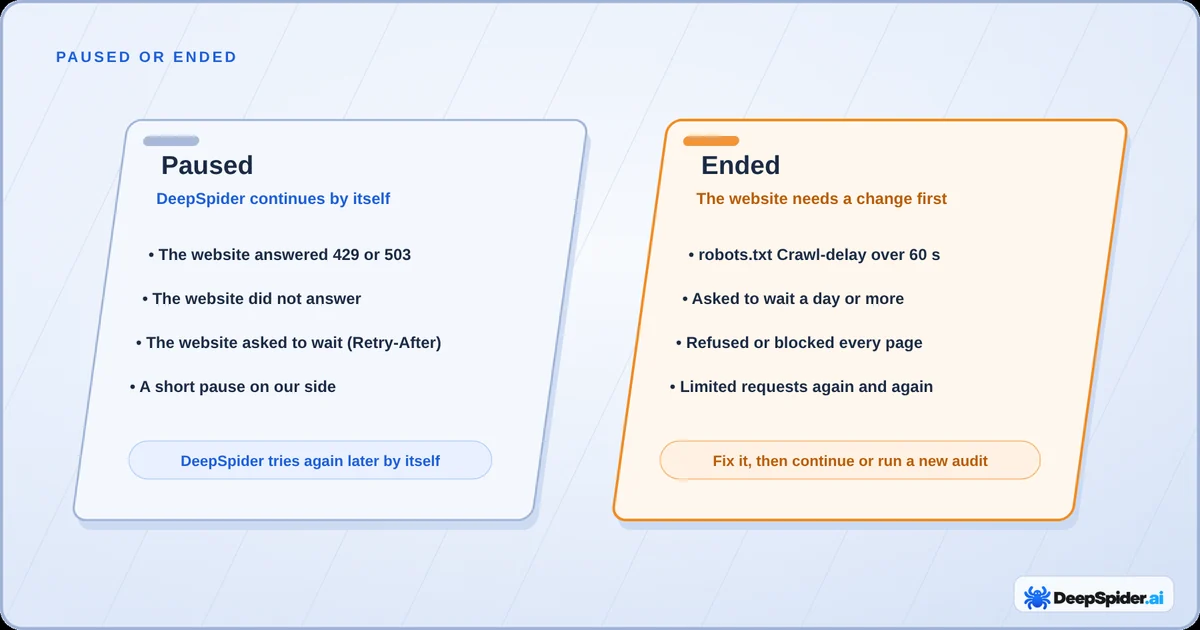
Most pauses are the website asking DeepSpider to slow down, and DeepSpider continues by itself. Some audits end because the website needs a change first. Here is how to tell them apart and what to do.
- Paused: the website asked DeepSpider to slow down. DeepSpider keeps everything and continues by itself, a little slower each time.
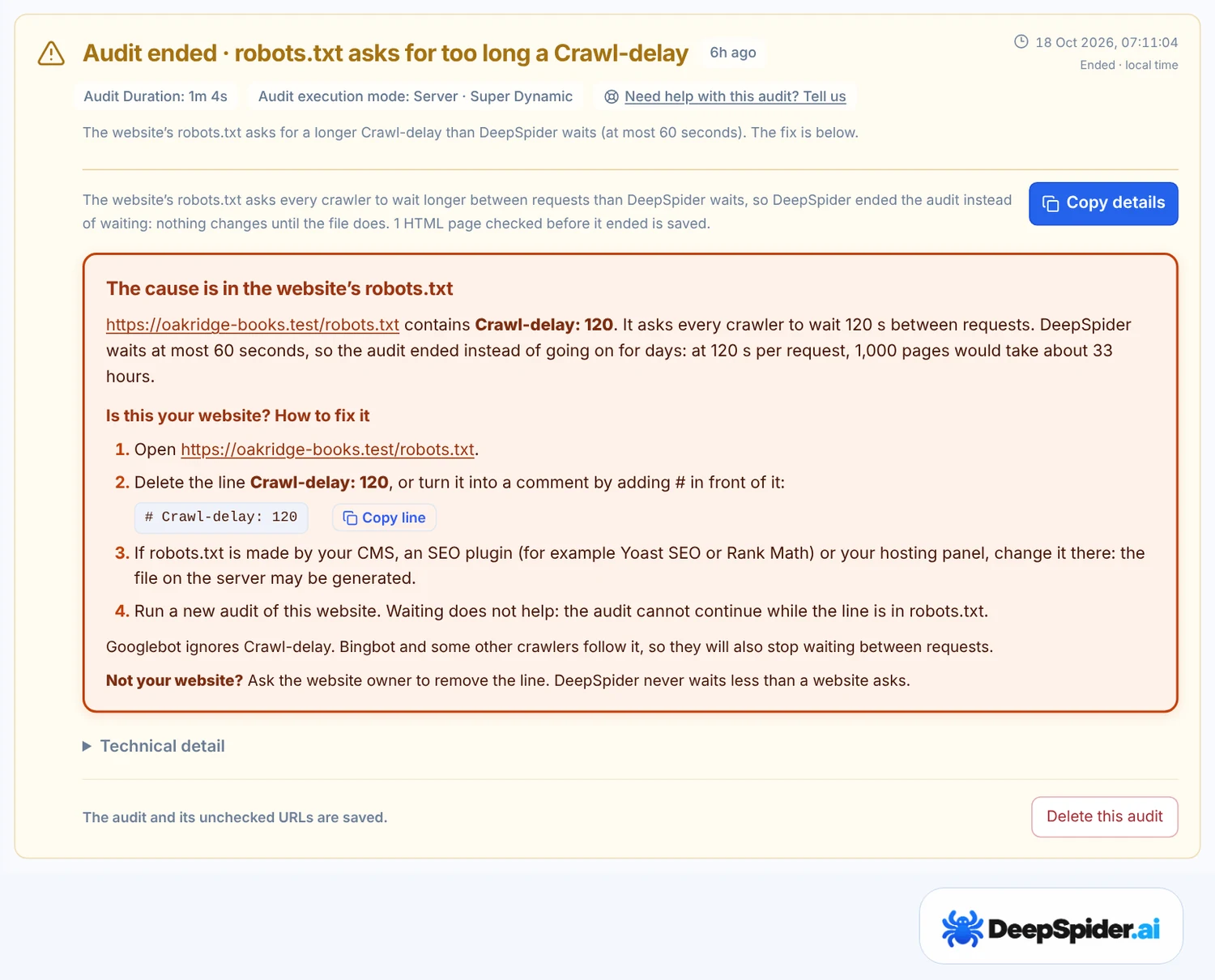
- Ended: the website needs a change first, for example a robots.txt Crawl-delay over 60 seconds or bot protection that blocks every page.
- A yellow finished audit is not a failure: the results are valid for what was checked, and the reason is named.
- Website owners can usually fix it by allowing the user agent
DeepSpider/1.1 SEO audit.
When the website asks DeepSpider to slow down
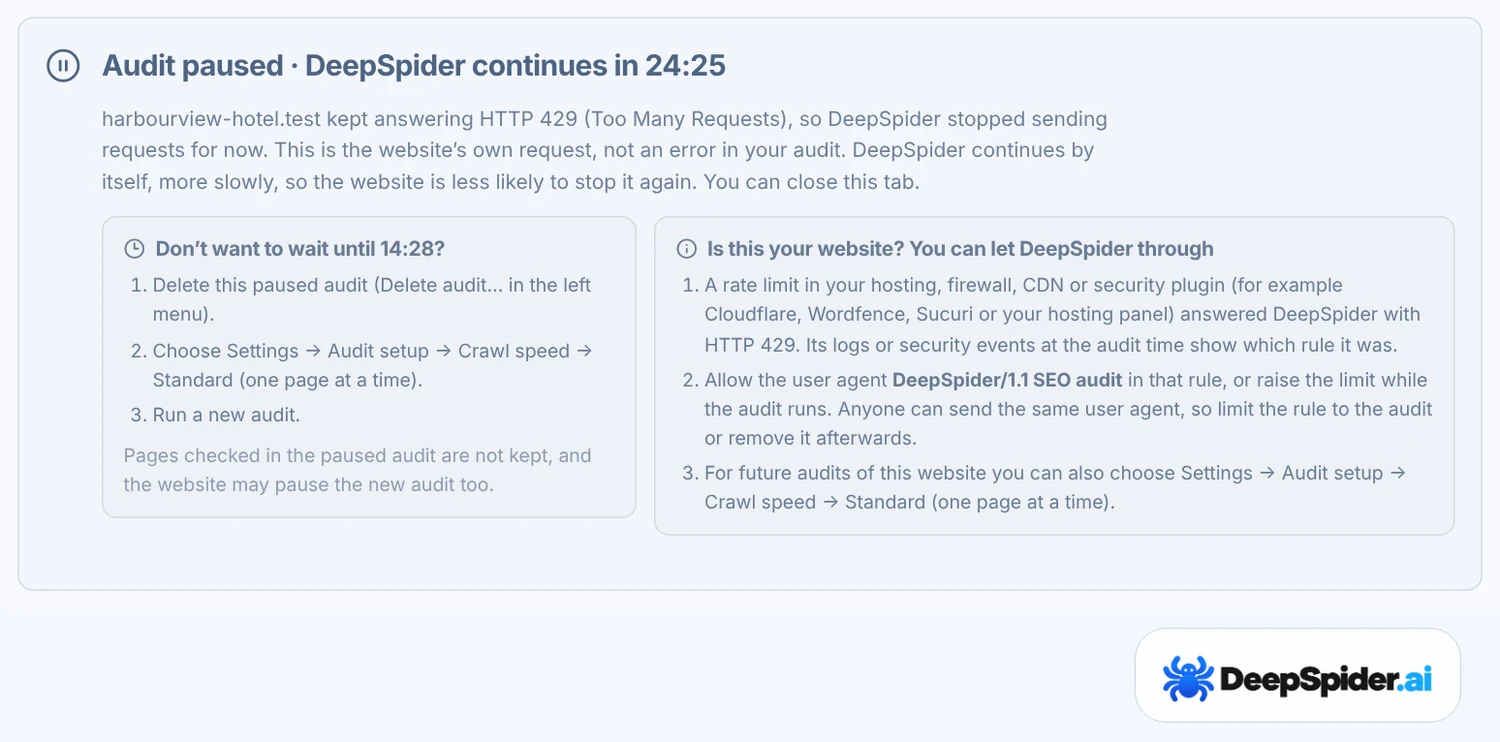
Websites protect themselves from too many requests. When a server answers HTTP 429 (too many requests) or HTTP 503 (service unavailable) again and again, sends a Retry-After header, or stops answering for 10 minutes, DeepSpider pauses the audit. Everything checked so far is kept.
The audit shows Audit paused · DeepSpider continues in … with a countdown. You don’t need to do anything:
- DeepSpider continues 30 minutes after a pause, or at the time the website named in Retry-After.
- Each continuation goes slower, with 1, 2, 4 and then 8 seconds between requests, so the website has time to recover.
- If a continuation checks nothing new, the next wait is longer: 1 hour, then 2 hours. After three continuations without progress, DeepSpider stops trying and you decide.
A paused audit can be continued for 7 days. Stop cancels the automatic continuation; you can still press Continue saved audit later.
When the pause is on our side
Sometimes a very large audit needs more memory or a save takes longer than expected. Then the box says the pause is on DeepSpider’s side and that there is nothing to do on yours. DeepSpider continues after 2, 10 and 30 minutes, then after 2 hours, and can move a very large audit to a server with more memory. Continuing a paused audit never uses another monthly audit.
When the audit ends instead
Some situations will not get better by waiting, so the audit ends and the worker is freed for other audits. The box names the reason and, where it applies, what the website owner can change.
| You see | What happened | What to do |
|---|---|---|
| Crawl-delay too long | robots.txt asks crawlers to wait more than 60 seconds between requests, the longest DeepSpider waits. | Remove the Crawl-delay line or lower it, then run a new audit. |
| The website asked to wait | The website asked DeepSpider to come back in 24 hours or more. You can change this limit in Settings → General → Audit setup → When a website asks to wait. | Try again later, or let DeepSpider in. |
| The website limited DeepSpider’s requests | The website kept answering 429 or 503 after the automatic continuations. | Let DeepSpider in, then press Continue saved audit. |
| Audit blocked | Bot protection, for example a Cloudflare challenge or a firewall, refused the first requests. | Allow DeepSpider, then run a new audit. |
| robots.txt blocks DeepSpider | robots.txt disallows every page for crawlers it doesn’t name. | Add User-agent: DeepSpider to the group that allows other crawlers. |
| Website not available | The website gave no answer, or its HTTPS certificate failed. | Check the address, with and without www. |
Finished, but with limits
A yellow result means the audit finished and names what limited it, for example Page limit reached, Sitemap blocked (HTTP 403) or images that were temporarily unavailable. The findings are valid for everything that was checked. View audit notes shows the details and, when the website can fix something, how.
If the limit was your own page or image limit, raise it in Settings and start a new audit. A finished audit cannot be extended.
Let DeepSpider in
If you own the website, these steps solve most pauses and blocks. Allow only what the audit needs, and remove the rule afterwards if you prefer.
- Find what refused the requests. The audit box shows the HTTP status and, for Cloudflare, the Ray ID. Search for it in your firewall, CDN or hosting logs.
- Allow the user agent
DeepSpider/1.1 SEO audit. In Cloudflare, create a custom rule where User Agent containsDeepSpider/1.1 SEO auditwith the action Skip. On the Free plan, Bot Fight Mode cannot be skipped and has to be turned off during the audit. - Check robots.txt. Remove a long
Crawl-delayline, or comment it out with#. Googlebot ignores this line anyway. - Slow the next audit down if the server is small: Settings → General → Audit setup → Crawl speed → Standard.
DeepSpider runs from servers in Frankfurt, Germany. A website that only refuses visitors from outside its own country can block the audit even though it works for you. A user agent can be imitated, so keep an allow rule limited to the audit.
Does it use one of my monthly audits?
Not when the audit gave you nothing useful. An audit is not counted when the website blocked DeepSpider or left most pages unreachable before half of its page URLs were checked, when no HTML page could be audited, or when a problem on our side ended it. Continuing a paused audit is never a new audit. The full rule is in the Terms of Service.
Questions & answers
Why did my audit pause when the website works fine in my browser?
Your browser makes a few requests; an audit makes thousands. Servers and CDNs often limit automated visitors, or visitors from another country, before they limit people. The pause reason shows what the website answered.
Should I press Continue saved audit straight away?
Not while the box shows a countdown. DeepSpider continues by itself at that time and more slowly. Pressing Continue earlier usually meets the same limit again.
Can I make DeepSpider ignore Retry-After or Crawl-delay?
No. DeepSpider follows the website’s requests to slow down. Ask the website owner to allow DeepSpider, or run the next audit with the Standard crawl speed.
Why did the audit end with only a few pages?
Usually because the website refused or challenged the requests from the start, or robots.txt disallows crawlers it doesn’t name. The box names the reason. An audit like this does not use one of your monthly audits.
Can Googlebot have the same problem?
Sometimes. A robots.txt rule or a redirect that needs cookies affects Googlebot too. Firewalls often let verified search engine crawlers through by IP address, so a block for DeepSpider does not prove Googlebot is blocked.
Paused means wait: DeepSpider continues by itself. Ended means the website needs a change first, and the box tells you which one. If it is your website, allow DeepSpider/1.1 SEO audit and remove a long Crawl-delay.
- RFC 6585, section 4: 429 Too Many Requests · IETF
- RFC 9110: Retry-After and 503 Service Unavailable · IETF
- RFC 9309: Robots Exclusion Protocol · IETF
- How Google interprets the robots.txt specification · Google Search Central
- Skip options in custom rules · Cloudflare