
Technical SEO
Google November 2026 Core Update: Is Your Traffic Drop Google or Your Site?
Google finished the November 2026 core update on 24 November and announced December’s. How to tell a core update drop from a problem on your own site, what Google says to do, how long recovery takes, and what to sort out before December.
On this page
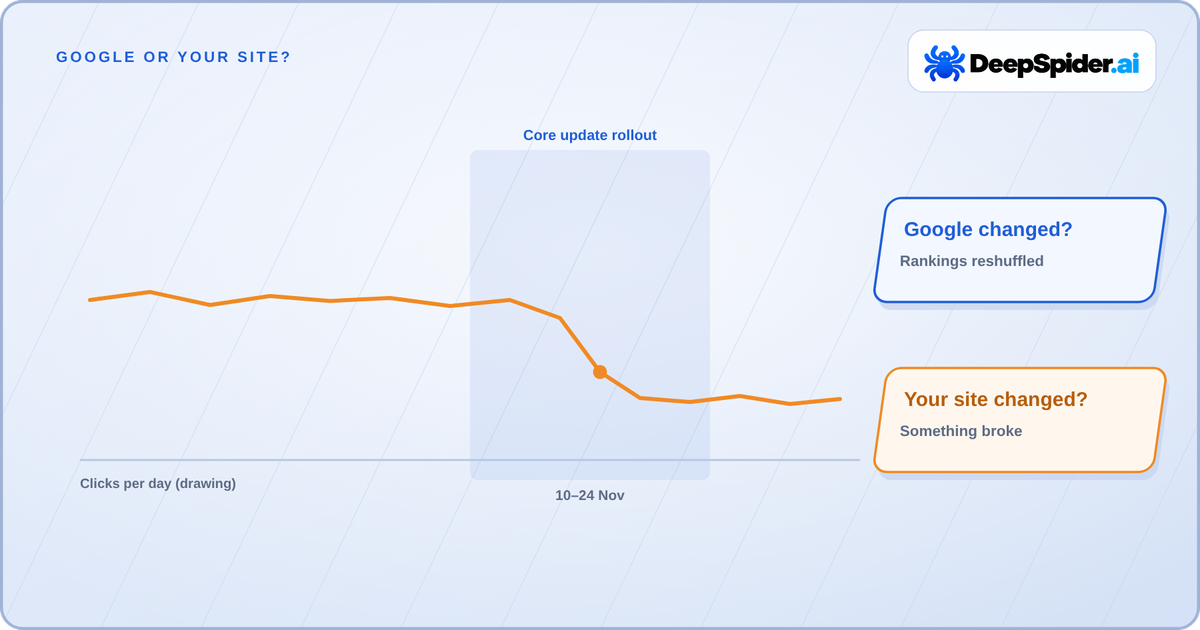
Google finished its November 2026 core update on 24 November, and in the same breath announced another one for December. If your traffic chart did something rude in the last two weeks, you now have two suspects: Google, or your own website. They need very different treatment. Fix the wrong one and you can spend a month “repairing” a site that wasn't broken, or wait patiently for Google while a stray noindex quietly eats your pages.
In short
The November 2026 core update ran from 10 to 24 November, with most changes showing up from 13 November. Google says to wait at least a full week after it finishes before you judge it. Then look at timing, shape and Search Console: a drop that started on the day you changed something, pages that vanished, and jumps in errors or noindex point to your site. Many pages losing a few positions during the rollout points to the update. For a core update drop there's no technical fix: improve the content and expect recovery to take months, sometimes until the next update.
What happened in November
The Search Status Dashboard is the official record: “Incident began at 2026-11-10 10:06 and ended at 2026-11-24 06:03 (all times are US/Pacific).” Google said it “applies globally and to all languages”.
Most sites didn't feel anything on day one. Sistrix wrote that “Changes are visible in UK and US data from the 13th November”, and Glenn Gabe put it more memorably: “I believe the update landed on Friday the 13th (Jason would be proud)...” Sistrix also found “no stand-out sector or content-model shift”. The clearest pattern in its UK data was reference and publisher sites losing ground to YouTube results and to content from institutions. One more detail fits this post nicely: “A number of large-scale migrations were caught up in the Core Update.” Some of the “losers” in its list had simply moved to a new domain.
One more thing made November messy: rank trackers. Barry Schwartz found the chatter “more muted than most” and suspects the tracking tools, which are struggling to follow Google's ranking changes. Gabe's advice is the one to keep: “GSC remains the source of truth.” Your own Search Console data beats any visibility index right now.
And December? Google has preannounced its next core update, which it has never done before. According to Google, it improves how its systems rank content, “including for longer and more complex questions”, and the personalised results of people who have personalisation turned on. The date: “We don't have a date yet -- we will announce it as usual the day it starts rolling out. It's not imminent.” The dashboard lists it as active anyway, and Schwartz reports that “Google again confirmed with me three times, the December 2026 core update is not live and not active.” So no, December didn't break your site. Yet.

First, wait a week. And mind the turkey.
Google's guide to core updates is clear: “We recommend waiting at least a full week after a core update completes before analyzing your site in Search Console.” That makes 1 December the earliest fair look at November's update. Google also opened a new ranking hub on 24 November that collects its advice on updates in one place.
There's a catch. That week is Thanksgiving, Black Friday and Cyber Monday. Google's own guide to traffic drops warns that “people search for diets in January, turkey in November, and champagne in December.” So when you compare a week after the update with a week before it, which is what Google suggests, put the same weeks from last year next to them too. Otherwise the shopping season will tell you a story about the algorithm.
Google or your site? Read the clues

Start with timing. If your clicks fell from around 13 November and nothing changed on your site that week, the update is the main suspect. If they fell the day after you launched a new theme, moved to a CDN or edited robots.txt, look at yourself first. And be honest about coincidences. John Mueller once told a site owner that their server outage “most likely has nothing to do with the changes you're seeeing, it was just awkward coincidental timing.” (The extra e is his.) In the same thread he added that downtime “of more than a day or two will have effects”. Both can be true.
Then look at the shape. A core update tends to move a lot of pages a few places, up or down. Technical problems are lumpier. A whole section disappears, a template loses its pages, a group of URLs starts returning errors. Some technical drops are slow on purpose, too: Google mentions “a misplaced noindex tag, which would depend on Google crawling the page, meaning there would be a slower drop in traffic”.
Then ask Search Console. Google's advice: “Check the Crawl stats report and Page indexing report to find if there's a corresponding spike in issues detected”. A jump in 404s, server errors or “Excluded by ‘noindex’ tag” in the same week is a confession. Positions slipping while every page stays indexed is not.
Two more clues catch people out:
- Clicks fall but impressions stay the same. That's usually not about rankings at all. Google says it can mean your titles and snippets aren't working, and AI Overviews can do it too. Ahrefs followed 963 of the sites with the most clicks in France and found that after AI Overviews arrived there, “Barely anyone lost rankings”. Pages still showed up. “They just get clicked less.”
- Your data was wrong before it was right. Google itself notes that a drop “might be related to a change in the data processing or a logging error.” And between 31 October and 2 November, Marie Haynes saw clicks in Search Console on some of the sites she monitors jump to between two and six and a half times normal while impressions stayed flat. Her verdict: “it is not human traffic.” If those days are in the week you compare against, part of your “drop” is just the spike ending.
The opposite mistake is just as common. Mueller, back in 2021: “I would not assume traffic changes are indicative of technical issues”, because “it's easy to spend a lot of time "fixing" technical things when the problem is elsewhere.” He's right. We'd still check the boring technical stuff first, because it takes an hour and it's the only kind of drop you can fix this week.
If it's your site
- Check Page indexing and Crawl stats. Look for a spike in errors, noindex or redirects in the week the drop started.
- List what changed on your side. Deploys, plugin updates, a new theme, robots.txt edits, redirects, canonical tags, a CDN move. Ahrefs once looked at a drop that roughly lined up with a core update. The exact date didn't, and the likelier cause was much duller: “this website’s top traffic-driving pages were dead pages.”
- Find the pages that lost the most. In the Performance report, compare two periods and, as Google puts it, “Select Clicks Difference to order it based on pages that lost the most traffic.” Then open those pages and see what they return today.
- Fix it, then give Google time. Google has to crawl the fixed pages again before anything recovers. For a whole site that can take weeks.
If it's the core update
Here Google's advice is mostly about what not to do. “There's no need to take drastic action (in fact, we recommend avoiding making changes to content that's already performing well).” “Avoid doing "quick fix" changes”. And: “Deleting content is a last resort,” which is good to hear before you delete half your blog in a panic.
It helps to remember that a core update drop is relative. Google's example is a list of the best restaurants in a city: when new places open, “restaurants that move down aren't necessarily "bad"; there are just other restaurants that make your top 20.” Someone else got better, or Google got better at noticing them.
Recovery is slow. Google's guide says: “If it's been a few months and you still haven't seen any effect, that could mean waiting until the next core update.” It also says “you don't necessarily have to wait for a major core update to see the effect of your improvements.” And Mueller's take on what doesn't help is worth framing: “This is not about dialing back the ads from infinity to infinity-1, disavowing 5 links, buying 5 links, nor about switching to another SEO plugin.” His follow-up is less fun but honest: “consider that you've possibly had a good run already”. Danny Sullivan said something similar in 2025: improvements don't mean “all sites will go back up to wherever they were if they are down from a previous peak.”
So the work is the slow kind. Look at the pages that lost, then at the pages that replaced them, and ask what a searcher gets there that they don't get from you.
Before December
- Save your baseline. Export your Search Console performance data now, so you have a clean before picture when December's update arrives.
- Don't ship a redesign in the middle of a rollout. If you change everything in the same week as Google, you'll never know which of you did it.
- Write down what you change, and when. A simple dated list of deploys and content changes turns the next “was it us?” question into a five-minute job.
One of our own sites
Going back through Search Console for a small site we run, we found a drop that had nothing to do with any update. From 19 to 24 October its impressions fell from about a thousand a day to between zero and three, then came back. No core update was running. The November one only started on 10 November.
We still don't know what caused it. It could have been the server, a plugin, or one of Search Console's own reporting glitches. What we do know is that it wasn't a core update. If the same thing had happened three weeks later, in the middle of the rollout, we would have blamed Google without a second thought.
The lesson is the boring one from the list above. Without a dated record of what changed, and without server logs, a drop like that stays a mystery.
What DeepSpider helps with
DeepSpider can't tell you what Google's algorithm thinks of your content. It can tell you, fast, whether your site changed.
Run an audit, and if you have an earlier one of the same site, open Compare Audits. Its site-wide panel shows whether robots.txt started answering with errors, whether Googlebot is now blocked from the home page, which robots.txt lines were added or removed, and whether the HTTPS or www setup changed. Below that, “What changed for search” goes through every page both audits checked and flags pages that stopped returning 200, became noindexed (and whether the noindex came from the HTML or the HTTP header), changed their canonical tag, lost their title, H1 or structured data, or lost a big part of their text.
If you upload your Search Console export with its Dates table, DeepSpider draws your clicks per day with Google's ranking update windows on top, so you can see whether a drop lines up with an update. It says plainly that an update date doesn't mean the update caused the change. And if you can get your server logs, Bot activity shows the status codes Googlebot really received, day by day, including spikes of server errors.
Our help page on tracking progress explains how to compare audits so the comparison is fair.
FAQ
Is the December core update live yet?
Not as of 25 November. Google says it will announce it on the day it starts, and that it's “not imminent”.
Is a core update a penalty?
No. Barry Schwartz said it again in his write-up of this one: “It is not a penalty, it promotes or rewards great web pages”. It doesn't feel that way when it's your pages being outranked, we know.
How long until I recover?
If it was a technical problem, weeks after the fix. If it was the core update, often months, and sometimes not until the next core update.
Should I change my content while an update is rolling out?
Better not. Wait until it's finished and a week has passed, so you know what you're reacting to.
Sources
- Google Search Central: Google Search's core updates and your website (updated 10 December 2025)
- Google Search Central: Debugging drops in Google Search traffic (updated 10 December 2025)
- Google Search Status Dashboard: November 2026 core update (10–24 November 2026)
- Google Search Central: Google Search ranking hub (published 24 November 2026)
- Search Engine Roundtable (Barry Schwartz): Google November 2026 Core Update Ranking Flux - What We're Seeing (16 November 2026)
- Search Engine Roundtable (Barry Schwartz): Google November 2026 Core Update Has Completed Rolling Out - What Happened? (24 November 2026)
- Search Engine Roundtable (Barry Schwartz): Google December 2026 Core Update Preannounced - Complex Queries & Personalization (24 November 2026)
- Search Engine Roundtable (Barry Schwartz): Google's John Mueller On Recovering From Core Updates - Maybe You Had A Good Run (28 May 2024)
- Search Engine Roundtable (Barry Schwartz): Google Says Search Traffic Changes Aren't Always Indicative Of Technical Issues (1 June 2021)
- Search Engine Roundtable (Barry Schwartz): Google Search: No Specific Date For Independent Sites Surface Better (24 March 2025)
- SISTRIX (Steve Paine): Google November 2026 Core Update: Information and Analysis (updated 25 November 2026)
- Ahrefs (Chris Haines): Google Ranking Dropped Dramatically? (Here's What to Check) (11 May 2023)
- Ahrefs (Juliette Begue, Xibeijia Guan): AI Overviews Cut CTR by 23.1% in France (16 September 2026)
- Marie Haynes: Massive Click Spikes in Google Search Console (Early November 2026): What Is Going On and How to Filter Your Reports (3 November 2026)